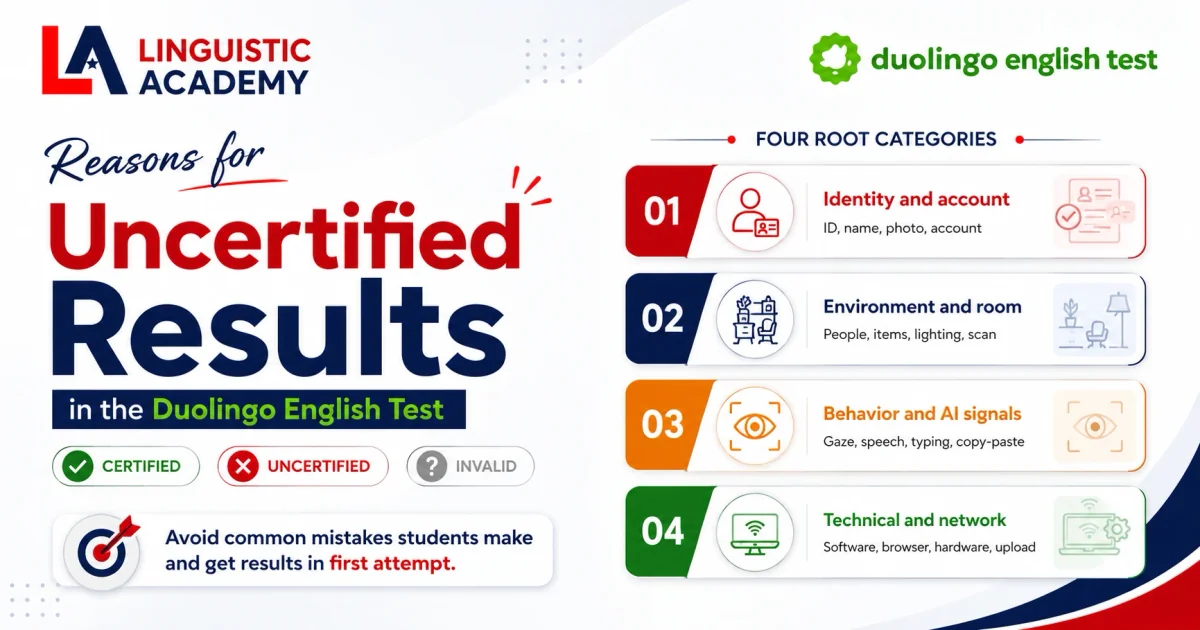
Reasons for Uncertified Results in Duolingo English Test (DET)
Your DET score came back Uncertified. Here is every reason, what Duolingo's proctoring AI actually checks, and how to fix it before your next attempt.
What does Uncertified actually mean on the DET?
You paid 70 USD. You sat for an hour. Then you saw the worst word. Uncertified. It means your result is not usable. The score exists, but no university will accept it. Let us explain what it means. Then we will look at your next options.
The Duolingo English Test has three end states for every attempt:
- Certified is the one you want. It means Duolingo's AI and human reviewers both approved your session. Your score is ready to send.
- Uncertified is what this article covers. It means the system saw a rule break. Your score is blocked.
- Invalid is rare. It usually means the test crashed or your internet dropped. No score was produced.
Universities only see Certified results. An Uncertified attempt is invisible to admissions. That is the small good news.
For format and dual-camera setup before your next attempt, use the Duolingo English Test guide.
But you pay 70 USD again. And you wait 48 hours more. Duolingo English Test
Three end states for every DET attempt
Certified means your score passes Duolingo's integrity review and goes live in your account. Uncertified means a rule was broken, the focus of this article. Invalid means no score was produced, usually from a crash or a connection drop. The table underneath maps them side by side.
| Status | What it means | What you can do |
|---|---|---|
| Certified | Your score is live and valid for 2 years | Send to universities immediately |
| Uncertified | A rule was broken, score is blocked | Appeal within 72 hours, or buy another attempt |
| Invalid | Test data did not upload, no score | Retake within your credit window |
The full reason tree: every reason your DET can be Uncertified
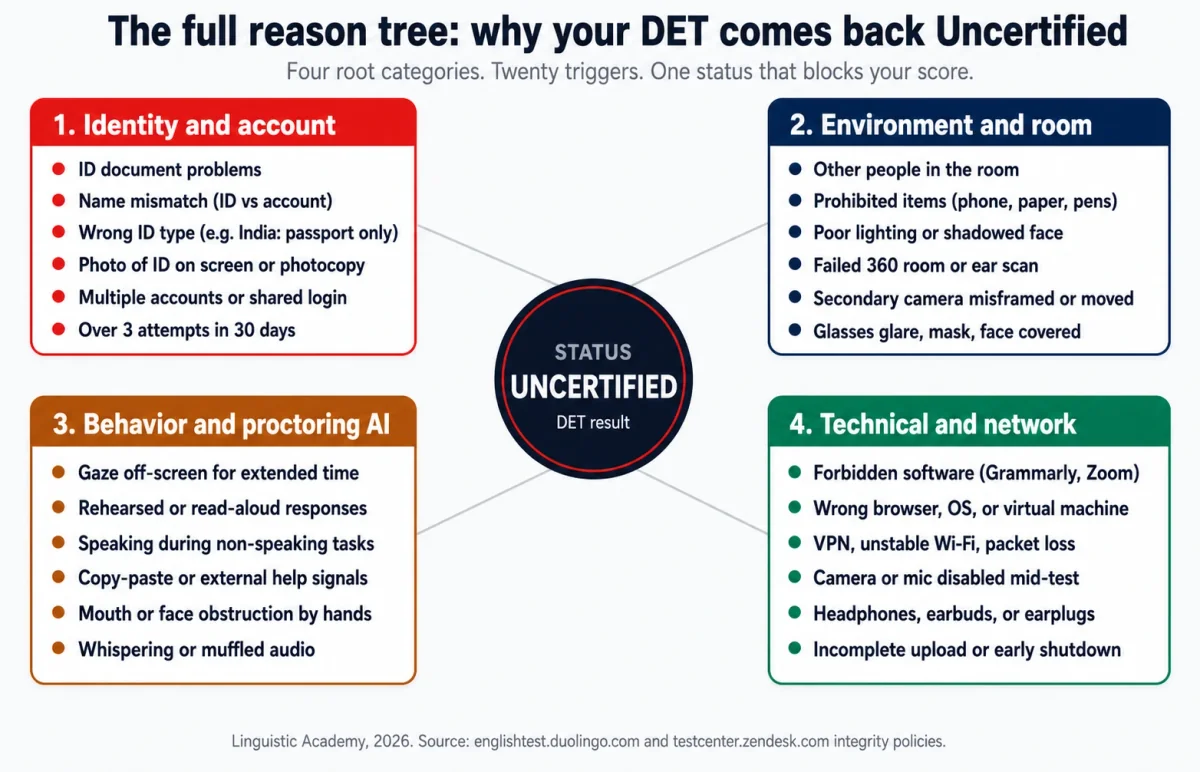
Every Uncertified result comes from one of four root categories. Below is the full tree. The next sections go deep on each one. You will see the rule, an example, and the reason for every trigger.
Category 1: identity and account issues
Identity is the first check. If Duolingo cannot confirm who you are, the result stays locked. The system checks your ID at the start. It checks again during human review. Most flags come from a small mismatch. You could have fixed it in five minutes.
ID document problems.
- A blurry photo stops the scan
- An expired passport stops the scan
- A torn corner or glare on the hologram stops the scan
- You must show the original physical document. A photo on your phone, a scan, or a photocopy is rejected. Duolingo English Test
Name mismatch between ID and DET account.
- Your account name must match your passport exactly Duolingo English Test
- Middle names, accents, and married names can cause a flag
- If your account says Maria Santos but your passport says Maria Juliana Santos-Pereira, the system blocks the result
Wrong ID type for your country.
- Most students use a passport
- In India, only a valid passport is accepted. Aadhaar, PAN, voter ID, and student cards are rejected
- Check the official list at englishtest.duolingo.com/ids before test day
Multiple accounts or account sharing.
- You can only use one DET account
- A second account, shared login, or another person's name voids the result
- It can also lead to a permanent ban
Over the attempt limit.
- You get up to 3 attempts in any 30 days
- Invalid and Uncertified attempts count toward this limit
- Going over blocks new purchases
Your ID passes if it meets all 5 of these
- It is a passport or government-issued photo ID accepted in your country
- It is not expired and is in good physical condition
- The photo, name, and document number are clear and unglared
- The name on the ID matches your DET account exactly
- You are holding the original physical document, not a photo or photocopy
Maria Santos
Maria Juliana Santos-Pereira (matches the name on her passport)
Update the passport first, then the account
If you changed your name recently, update your passport before you update your DET account. The account must match the document you present on test day, not the other way around. A name that does not exist on any government ID will be flagged.
What room and lighting issues can make your DET Uncertified?
The webcam sees your room for the full hour. If the camera sees it, the AI sees it. In 2026, the DET uses two cameras. Your laptop webcam shows one view.
A phone or tablet, set up as a secondary camera, shows the other. If either camera flags a problem, your result is at risk. Duolingo English Test
Face and lighting.
- Your face must be clearly visible the whole time
- No shadows, backlighting, or dim rooms
- Glare on glasses counts as face obstruction
- The system asks you to remove glasses at check-in
Other people in the room.
- The room must be empty of other humans for the full hour
- A child opening the door can trigger a flag
- A partner checking on you can trigger a flag
- Even a pet crossing the desk has triggered flags
Failed room or ear scan.
- The 360-degree scan is not optional
- Show all four walls, the door, behind the monitor, and the desk
- The ear scan happens during setup
- A rushed or incomplete scan gets your session rejected
Test-day room checklist
- Desk is empty. No paper, pens, phones, or second monitor
- No headphones or earbuds. Built-in speakers and mic only
- Both ears visible during the setup scan
- Door closed and visible to the webcam
- Lighting bright on your face, no shadow or backlight
- No one else in the room for the full hour
- Secondary phone or tablet on a charger, in landscape, framed to show your screen, keyboard, and hands
- Phone set to Do Not Disturb before you start
Do the 360-degree check yourself, 10 minutes early
Stand up. Walk slowly in a circle. Show the walls, the door, the ceiling fan, the bookshelf behind you, the area behind your monitor. Look at the desk from the camera angle. If you would not want an admissions officer to see it, remove it now. The same scan you do is what the proctor will see.
What desk and equipment issues can make your DET Uncertified?
Your desk is scanned on its own. The AI looks for anything that could be used to cheat. This includes items you never touch. The safest plan is to start with a completely empty desk. Then add only the testing computer.
Prohibited items in view.
- The desk must be empty except for the testing computer
- No paper, pens, notebooks, second monitor, smartwatch, books, or headphones
- The only phone allowed is the secondary camera
- A water bottle can be a problem. The AI may mistake it for a phone. Skip the drink.
Headphones, earbuds, earplugs.
- All types are banned. This includes transparent, single-ear, and bone-conduction. Duolingo English Test
- Use the built-in laptop speakers and microphone only
- The AI checks by asking you to show both ears at setup
Your desk passes the setup scan if it meets all 6 of these
- Desk is empty except for the testing computer and a charger cable for the secondary phone
- No paper, pens, notebooks, books, or second monitor within arm's reach
- No smartwatch, jewelry, or accessories on the desk surface
- No water bottles, drinks, or food that the AI could mistake for a phone
- Built-in laptop speakers and microphone are the only audio path in use
- No headphones, earbuds, earplugs, or bone-conduction devices of any kind
Paper, pens, a second monitor, or a smartwatch sitting within arm's reach of the keyboard
A completely empty desk with only the testing laptop and a charger cable for the secondary phone
Headphones are banned, even bone-conduction
No headphones, earbuds, or earplugs of any kind. Built-in laptop speakers and microphone are the only audio path allowed. The setup scan asks you to show both ears, and the AI verifies the audio source throughout the test.
Category 3: behavior and proctoring AI signals
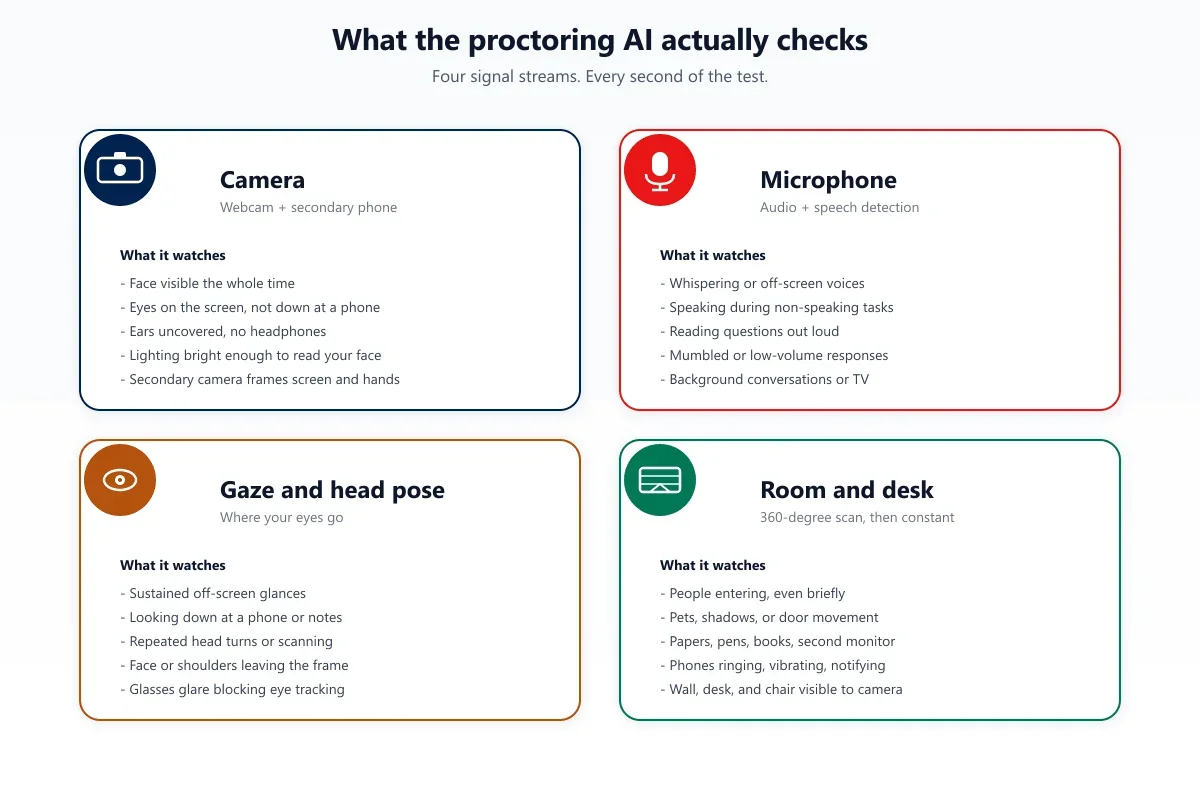
The AI watches what you do. It does not just watch the room. This category catches students who did everything else right. But they gave the system a reason to doubt them. The exact flag wording is worth knowing. The AI is consistent about its patterns.
Gaze and head pose.
- Gaze tracking is the most common behavior flag
- Looking away from the screen for a long time triggers it
- The flag message reads: 'You looked away from the screen for an extended period of time'
- Glancing at the keyboard is fine
- Glancing at your phone, the wall, or a person off-camera is not
- Repeated head turns count the same
Speaking or mouthing during non-speaking tasks.
- Reading aloud gets flagged
- Mouthing words during Listening gets flagged
- Whispering during Writing gets flagged
- The flag message reads: 'During the speaking section, it was evident you were reading a response that had been written out'
Suspicious typing patterns.
- Long pauses followed by fast bursts get flagged
- Copy and paste gets flagged
- Text that matches other submissions gets flagged
- The AI checks your typing rhythm against normal human patterns
Browser focus and tab switching.
- Alt-tab breaks the secure environment
- Opening a new window breaks it too
- A screen-recording tool can also break it
- The system logs every focus loss
Face obstruction.
- Covering your mouth counts as obstruction
- Covering your ears counts too
- Using hands or clothing also counts
- The AI keeps watching after the setup scan ends
The official DET rules prohibit looking away from the screen, reading or memorizing answers, speaking when not instructed, taking notes, interacting with others, and using headphones, earbuds, VPNs, virtual machines, or any assistive software. Duolingo English Test
The 5 behavior triggers that flag your session
- Gaze off-screen for an extended period (looking at your phone, the wall, or a person off-camera)
- Mouthing or reading aloud during Reading, Listening, or Writing tasks
- Copy-paste or text patterns that match other submissions (typing rhythm flagged as non-human)
- Whispering or any off-screen voice picked up by the microphone
- Face obstruction (covering your mouth, ears, or face with hands or clothing at any point)
Wearing AirPods during the test to hear the Listening section more clearly
Built-in laptop speakers at moderate volume, with the laptop mic open for Speaking
“Mouthing the words while reading each Reading passage, then speaking the Speaking prompts with a rehearsed tone”
“Silent face and still lips during Reading and Writing items, then natural pauses and rephrasing when thinking during Speaking”
The 3-second rule on Speaking items
If you stay silent for more than 3 seconds on a Speaking prompt, the system assumes you are done and moves you on. You lose the rest of the response time. Fill thinking pauses with transitional phrases like "and another point is" or "what this means in practice is". The microphone stays open. The score stays intact.
Category 4: technical, browser, and network issues
Some Uncertified results are not your fault. The test crashes. The internet drops. The camera stops working. The system cannot certify what it never fully got. These flags are the hardest to argue in an appeal. Duolingo says you cannot appeal technical failures. You must retake.
Unsupported device or operating system.
- You need a Windows or Mac laptop or desktop
- Surface Pro in tablet mode is rejected
- Chromebooks and Linux are rejected
- Virtual machines are detected
- Dual monitors must be disconnected
- Run the system check in the DET app 48 hours before
- Use the exact computer you will test on
Wrong browser.
- The DET runs only in the current Google Chrome
- Safari, Firefox, Edge, and Brave are all blocked
- Outdated Chrome is also blocked
- The DET desktop app is safer for writing
Network instability.
- A VPN can flag you. Duolingo English Test
- Unstable Wi-Fi can flag you
- ISP throttling or packet loss can flag you
- A drop mid-test can flag you
- Use wired ethernet when you can
- A drop of a few seconds can end the session
Forbidden software.
- Grammarly, Zoom, Skype, Discord, and Slack all trigger flags
- WhatsApp, TeamViewer, and AnyDesk also trigger flags
- Predictive text and auto-complete trigger flags
- Non-Latin input methods like Pinyin trigger flags
- The DET app does a full system scan. Close everything first.
Hardware failure mid-test.
- Your OS can revoke camera permission
- Another app can take over your microphone
- Headphones on the Bluetooth list can still connect
- Any of these can stop proctoring mid-session
| Setup | Supported | Not supported |
|---|---|---|
| Computer | Windows 11+ laptop or desktop | Surface Pro, Chromebook, Linux, virtual machine |
| Operating system | Licensed Windows or Mac OS | Work laptops with admin firewalls, dual-boot |
| Browser | Current Google Chrome | Safari, Firefox, Edge, Brave, outdated Chrome |
| Network | Wired ethernet, stable Wi-Fi | VPN, mobile hotspot, public Wi-Fi |
| Audio | Built-in speakers and microphone | Headphones, earbuds, earplugs, headsets |
| Displays | Single monitor | Dual monitors, external displays |
| Background apps | None | Grammarly, Zoom, Discord, Slack, TeamViewer |
48 hours before the test
- Run the DET system check on the exact computer you will use
- Restart the computer to clear stuck background processes
- Uninstall or disable Grammarly, auto-complete, predictive text
- Force quit Zoom, Slack, Discord, and any screen-recording tools
- Disable your VPN and check the connection with a speed test
- Charge the laptop to 100% and plug in the secondary phone
- Clear the desk. Remove papers, pens, second monitor, smartwatch
- Switch the phone to Do Not Disturb before you start
The review and appeal process
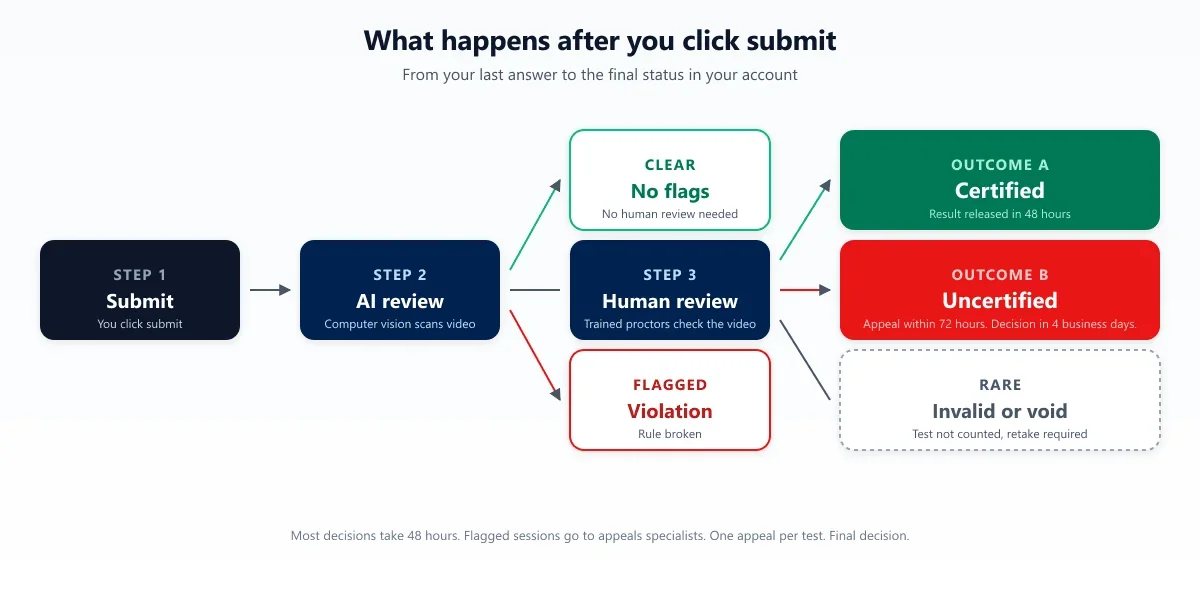
You clicked submit. What now? Every DET attempt goes through the same review steps:
- The AI scans the video first
- If nothing looks wrong, the result goes to Certified within 48 hours
- If something looks off, a human reviewer watches the video
- The outcome is either an override (Certified) or a confirmation (Uncertified)
The appeal window is 72 hours from the time you get the notice: Duolingo English Test
- After 72 hours, the button is gone
- You can only appeal if your account is blocked or the attempt used your test credit
- Technical failures cannot be appealed. You must buy a new attempt.
The decision turnaround is 4 business days:
- An appeals specialist watches your full session
- They email you a final decision
- You get one appeal per test. Duolingo English Test
- The decision is final. No second appeal. No escalation.
On the refund question:
- Duolingo does not refund Uncertified results from rule breaks
- Rule breaks include headphones, name mismatch, and background software
- If the flag was a technical failure on Duolingo's end, they may give a free retake
- The retake must happen in your original credit window
An Uncertified result does not count against you permanently
Your test credit is consumed, but your account stays clean and the Uncertified attempt does not appear on your record. You can buy another attempt and try again today. Admissions offices only see the Certified scores you choose to send.
Quick-reference matrix: reason to trigger to fix
If you only have 30 seconds, scan this table. The full reasons are in the sections above. Each row shows the problem and the quick fix.
| Category | Trigger | What the AI sees | Quick fix |
|---|---|---|---|
| Identity | Blurry or expired ID | Document unclear in photo | Use original, unexpired passport |
| Identity | Name mismatch | Passport name differs from account | Update account to match passport |
| Identity | Wrong ID type (India) | Aadhaar or PAN instead of passport | Use a valid passport |
| Identity | Photo of ID on phone | Screen reflection, not physical card | Show the original document |
| Identity | Multiple accounts | Same person, two emails | Use one account for life |
| Environment | Other person in room | Movement in background | Lock the door, tell your household |
| Environment | Paper or pen on desk | Forbidden note-taking tool | Clear the desk completely |
| Environment | Headphones on | Audio device blocks ear scan | Use built-in speakers and mic |
| Environment | Failed 360 room scan | Wall or door not shown clearly | Walk slowly, show all four walls |
| Environment | Secondary camera moves | Phone shifts mid-test | Use a heavy stand, never touch it |
| Behavior | Gaze off-screen | Sustained look away from monitor | Eyes on the screen at all times |
| Behavior | Mouthing words | Mouth movement during Reading | Read silently, lips still |
| Behavior | Rehearsed response | Detected as read from script | Use your own words, naturally |
| Behavior | Copy and paste | Paste detected in writing | Type every word, no shortcuts |
| Behavior | Whispering | Off-screen voice on mic | Silent unless Speaking task |
| Technical | Wrong browser | Safari or Edge used | Switch to current Chrome or DET app |
| Technical | VPN active | Location masked from system | Disable VPN, use real network |
| Technical | Grammarly running | Background process detected | Uninstall or disable before test |
| Technical | Camera disconnects | Mid-test video loss | Close other apps, revoke permissions |
| Technical | Premature shutdown | Test data not uploaded | Wait for the green confirmation screen |
How Linguistic Academy helps you get a Certified DET score
You can spend 4 to 8 weeks on practice tests. You can try every prep course on the market. Some Uncertified results still happen. Why? The test day setup is the part no course covers. No course covers the room, the lighting, or the secondary camera. No course covers the browser or the 360 scan you only get one chance to do right.
If your deadline is close, you may not have weeks to wait. If the last attempt failed for a technical or room reason, the next one will fail too. The room and the equipment have to change. They have to change before you test again.
Linguistic Academy takes a different path. A trained professional works with you during your real test session. We handle the equipment. We handle the technical setup. We prepare your system, place the secondary camera, and run the room scan with you. On test day, we are with you for the full hour. The room, the rules, and the proctoring AI never become your problem.
If you need a Certified score on a short timeline, read cheat in Duolingo English Test for how test-day support works.
We have done this over 1,000 times. We work across 30 countries. The success rate is 99.9 percent. If you need your target score by your deadline, this is the fastest path to a Certified result.
Your target score, guaranteed
We guarantee your target score. If you do not get the result you need, we work with you until you do. No extra cost. No fine print.
How the exam help process works
How the exam help process works
Tell us your details
Your target score, timeline, and background. That is all we need to get started.
We assess your case
We review your situation and confirm if we can take it on. Most cases are approved within 24 hours.
Technical setup
We guide you on the equipment you need and handle all the technical preparation so nothing goes wrong on the day.
Exam day support
We prepare your system, walk you through the entire process, and support you during the real test.
Score delivered
Your certified score gets sent directly to your university. No extra steps, no delays.
Frequently asked questions
What does Uncertified mean on the Duolingo English Test?
Uncertified is a status on your Duolingo English Test result. It means the system's proctoring AI or a human reviewer flagged a rule violation during your test, and your score is blocked from being released. Universities only see Certified results, so an Uncertified attempt is invisible to admissions. You can appeal within 72 hours or buy a new attempt.
Can I get a refund for an Uncertified DET result?
No. Duolingo does not refund Uncertified results caused by rule violations. If the system flagged you for headphones, a name mismatch, or forbidden software, you pay for a new attempt. If the flag was a genuine technical failure on Duolingo's end, you may be granted a free retake within your original credit window.
How many times can I retake the DET after an Uncertified result?
You can purchase up to 3 test attempts in any 30-day period. An invalid or Uncertified attempt still counts against this limit. Each retake costs **70 USD** (less with discount vouchers). There is no lifetime cap, and Uncertified attempts do not appear on your official record.
Does an Uncertified result appear on my score report?
No. An Uncertified attempt is recorded in your DET account history but is not visible to any third party unless you share it yourself. Universities only see the Certified scores you choose to send.
Can I appeal an Uncertified result?
Yes, but only if your account is blocked or the Uncertified result immediately consumed your test credit. You have 72 hours from the notice to submit the appeal through your account. Technical failures are not eligible. An appeals specialist reviews your session and emails a final decision within 4 business days. You get one appeal per test, and the decision is final.
Will the same setup fail me again?
Only if the original trigger was environmental, like the room, the desk, the lighting, or the ID. If the flag was behavioral (gaze, mouth movement, suspicious typing), it usually repeats across attempts because it is a habit. If the flag was technical (browser, network, device), fix the underlying issue before retaking. Use the quick-reference matrix in section 8 to match your last result to a fix.
Related Articles
2026-05-31
What Is the Duolingo English Test? Complete 2026 Guide
What is the Duolingo English Test? The DET is a 70 USD, 1-hour online English test accepted by 5,700+ schools. Results in 48 hours. Complete 2026 guide.
2026-05-31
DET Writing Score Tips: How the AI Grades You and How to Beat It
The DET writing section is graded by AI, not a human examiner. That changes everything about how you should write. Learn the exact word counts, sentence structures, and transition words the algorithm rewards in 2026.
2026-07-02
Interactive Speaking: Duolingo English Test Maximum Score Guide (2026)
Learn Duolingo Interactive Speaking in simple English. Use a clear 35-second answer plan, easy model answers, daily practice, and test-day tips for A2 and B1 learners.
Ready to get a Certified DET score without the risk of another Uncertified result? Contact Linguistic Academy. Tell us your target score, your deadline, and the country you are testing from. We will confirm your case within 24 hours.
Get Started